

The three context objects
initial_context
Data available to the agent before the call starts — the contact’s name, account details, appointment information, anything the agent should know upfront. It can be set from several places:- API trigger — pass it in the request body when calling
POST /public/agent/{uuid}orPOST /telephony/initiate-call - Campaign CSV — columns beyond
phone_numberautomatically becomeinitial_contextfields for each contact’s call - Pre-call data fetch — enrich the context with data from your CRM or ERP via an HTTP call as the call starts, before the agent speaks
- Agent Settings — set template context variables on the agent for testing; they’re included in test calls from the workflow editor and ignored on production calls
Template variables
Values frominitial_context are available in your agent’s prompt using {{double_brace}} syntax.
Fallback values
If a variable might be missing or empty, use a pipe (|) to provide a default value:
customer_name is not set, the agent will say “Hello there” instead of leaving a blank. The syntax is:
Default variables
Built-in variables for current time and weekday, available in any prompt without setting upinitial_context.
Replace
<TIMEZONE> with an IANA timezone name such as Asia/Kolkata, America/New_York, or Europe/London.
When you use a timezone suffix on either
current_time or current_weekday, the other variable without a suffix will automatically use the same timezone instead of UTC. For example, if your prompt contains both {{current_time_Asia/Kolkata}} and {{current_weekday}}, the weekday will also be resolved in Asia/Kolkata.Telephony variables
For telephony calls (inbound and outbound), EESI automatically adds these variables toinitial_context:
For inbound calls,
caller_number is the customer’s number and called_number is your EESI number. For outbound calls, it’s the reverse — caller_number is your EESI number and called_number is the customer’s number.
gathered_context
Data the agent extracts during the call — the opposite direction ofinitial_context. Use it to turn a conversation into structured data: what the customer wants, whether they confirmed something, a value they gave you out loud.
How it gets populated
Turn on extraction on an Agent or End Call node and define one or more variables to extract. Each variable has: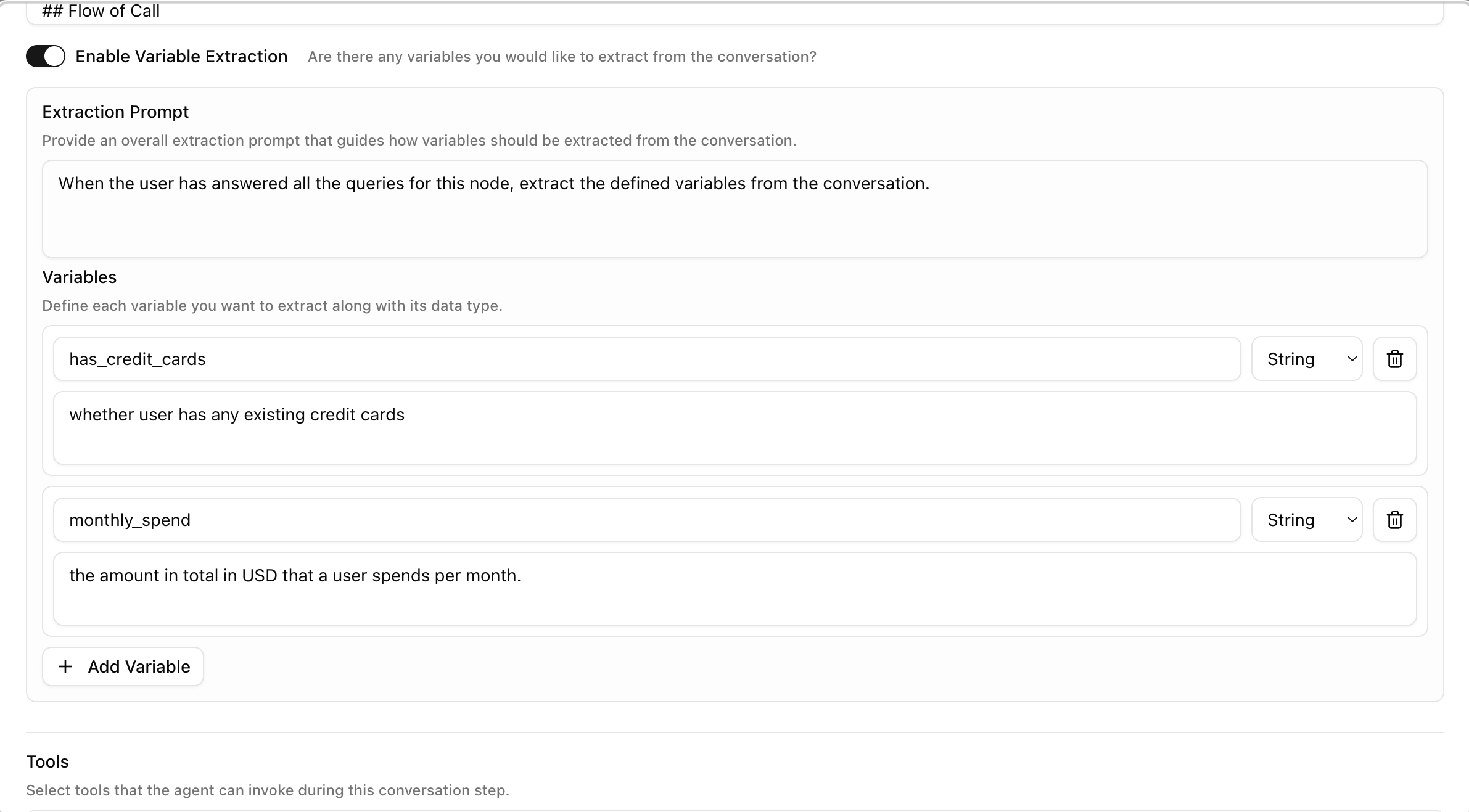 When the conversation reaches that node, the LLM reads the transcript so far and fills in each variable based on its
 prompt. If a value can’t be determined from the conversation, the variable is left empty rather than guessed — leave the prompt specific enough that the LLM knows exactly what counts as a match.
You can add extraction to more than one node. Each node’s extracted variables are merged into the same gathered_context object as the call progresses, keyed by name — reuse a name at a later node if you want to overwrite an earlier value.
How to reference it downstream
gathered_context is not available in Agent prompts — a prompt can only reference initial_context fields, because extraction typically happens after the conversation that would use it. To act on extracted data, send it out via a node instead:
gathered_context in a payload template.